 Robutech
Anti-standby & browser simulator
Prevent unwanted standby and stay present at all times.
This flexible, lightweight tool works unobtrusively in the background and reliably keeps your computer active. Ideal for home offices or company laptops, to keep business-critical applications such as Microsoft Teams, VPN connections or online presentations alive.
What is the anti-standby tool?
It is a standalone, Python-based program (compiled as a single portable .exe file) for the intelligent simulation of user activity. In the background it makes minimal mouse and keyboard movements, opens and controls the Edge browser in the foreground on request, and so reliably prevents Windows from switching to power-saving mode or the lock screen.
Main features at a glance
Detects all connected displays for targeted actions.
The browser window is positioned and maximised automatically.
Loads a fixed URL at start (e.g. robutech.ch), then random pages.
The matching Edge driver is downloaded automatically in the background.
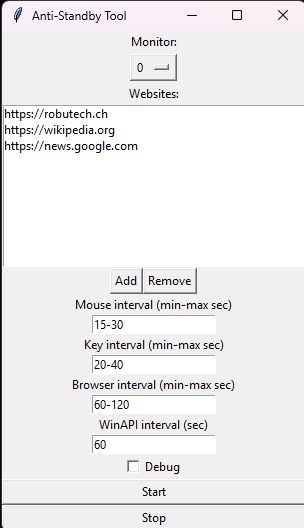
Manage your preferred websites via file or the built-in GUI.
Variable delays make the behaviour appear entirely human.
Uses native system calls – transparent and highly efficient.
A clear interface for starting and stopping within seconds.
Live logging of all simulated actions for maximum transparency.
Runs as a single file, without a Python installation.
Typical use cases
Home office & remote work: Keep your status active in communication apps and avoid automatic locking.
Presentations & webinars: Make sure your system does not shut down unexpectedly during long sessions.
Long-running render & IT tasks: Prevent power-saving mode during compute-intensive processes or large data transfers.
DevOps & test environments: Test presence-dependent applications easily in virtual desktops.
Your benefits at a glance
Runs entirely at user level.
Ready to use anywhere as a single .exe.
Through built-in jitter and genuine interaction.
Automatic driver management and transparent logs.
Increase your flexibility in day-to-day digital work and avoid disruptive interruptions. Try the current version now, without obligation.
Get in touch
Questions about the tool or feedback? Briefly describe your request.